
Every student should definitely have these 7 apps on their phone. Best apps for studying, notes, and productivity
In today’s time, a smartphone is no longer just a source of entertainment. If used correctly, the same phone can become a student’s biggest study partner. Many students buy coaching, books, and courses worth thousands of rupees, but they do not keep the essential apps on their phones that can make their studying easier.
The truth is that in today’s digital world, successful students do not rely solely on books. They use different apps for making notes, managing time, learning online, and increasing their productivity.
Whether you are preparing for school, college, competitive exams, or any professional course, you should definitely have some apps on your phone that can make your studying smart. In this article, I have written about 7 essential apps that every student should have on their smartphone.
Microsoft OneNote is the best app for making notes
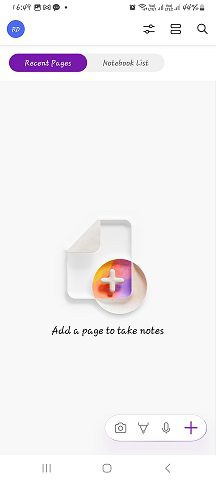
Making notes is the most important task for any student. But notes made on paper often get lost or remain unorganized, which causes students a lot of trouble in finding notes when needed. Also, if students save notes on this app, they can easily share them with their friends. In such a case, Microsoft OneNote is an excellent option for students.
Special features of OneNote
- Digital notebook feature
- Create different sections according to subjects
- Add text, photos, and PDFs
- Cloud sync support
- Can be used on both mobile and laptop
If you quickly make notes during class studies, OneNote can help you a lot. If students are not allowed to take electronic items like smartphones or laptops to school, they can use them at home.
Who is it useful for?
- School students
- College students
- Students preparing for job exams
- Students taking online courses
Google Drive: Secure Online Storage for All Notes and PDF Files
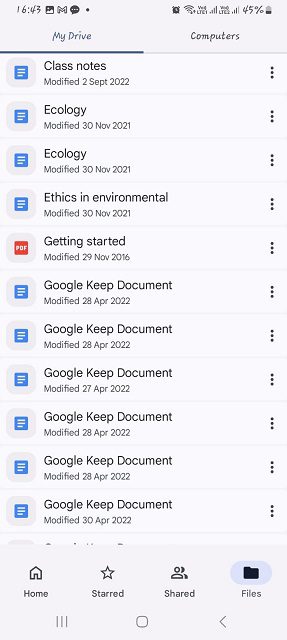
Many times, students lose important notes, PDF files, assignments, or images of notes due to phone damage or accidental deletion. The complete solution for this is Google Drive because all the files and documents saved through this app always remain saved in the user’s Gmail account. This way, students can view their files anytime and anywhere.
Why is Google Drive important?
- It provides free cloud storage of up to 15 GB.
- Backup of files remains permanent
- Easy facility to store PDFs, photos, and videos
- Can be accessed from any device
- Can be easily shared with anyone
If students have less storage on their phones, Google Drive becomes very necessary for them because once files are uploaded here, even if students delete them from their phone, the files remain saved in Google Drive.
Benefit: Your important notes always remain safe.
Notion: The Favorite Productivity App of Smart Students
Today’s students do not just study, but they study in a smart way. They make notes, track assignments, follow timetables, manage preparation during exams, and organize important resources in one place. Managing all these things is very important for a student if they want to stay ahead of other students. For this, Notion is very useful in managing all these tasks.
What can you do in Notion?
- Students can organize notes in one place
- It becomes easy to create a timetable for the whole day
- Track deadlines for school assignments
- Make exam preparation more systematic
- Easily save resources
- Plan group studies and manage group projects
Why is it so special?
Top rankers and productivity experts use Notion for their study management. Therefore, if you want to study in an organized way, definitely install this app.
Google Calendar – The Master Tool for Time Management
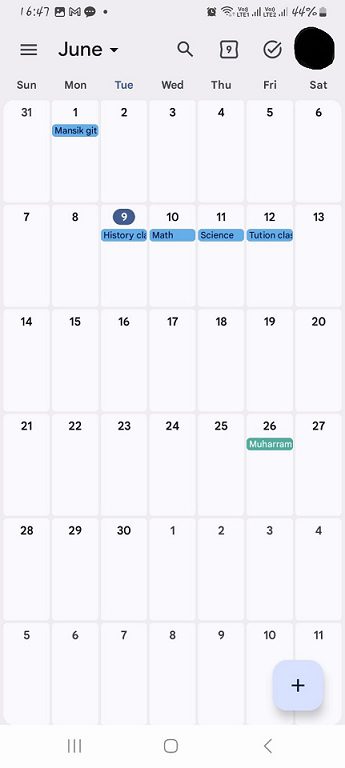
The biggest problem for most students is not being able to manage their time properly, which causes their entire week’s study plan to fail. If a student finds it difficult to manage all the work for the entire week, they can get help from Google Calendar and schedule their tasks, and it is especially beneficial for students who do part-time work along with their studies.
Benefits of Google Calendar:
- You can schedule your study plan
- You can save exam dates
- You can set reminders
- You can track assignment deadlines
- You can also easily manage your daily routine
Example: Suppose your exam is after 30 days; you can enter the study target for each day in the calendar and set a reminder for it, which sends you a notification when the date comes, so even if you accidentally forget, the notification will remind you.
Forest: The app that reduces phone addiction
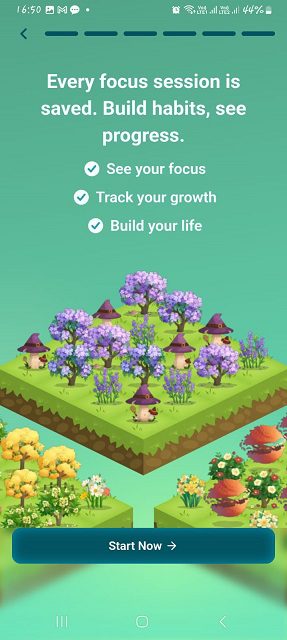
The biggest problem for today’s students is not studying, but distraction. They waste hours on Instagram, YouTube Shorts, and games, which gradually reduces their interest in studying. The solution to this problem for students is the Forest app.
How does the Forest app work?
When you start studying, a virtual tree is planted in the app. If you leave studying and go to another app, the tree will gradually wither, which alerts you about your phone addiction, and the withered tree reflects your failure.
Its benefits:
- Helps increase students’ focus
- Reduces mobile phone addiction
- Supports the Pomodoro Technique
- Prevents students from getting distracted while studying
Nowadays, many competitive exam aspirants use Forest to stay focused during study time.
By using ChatGPT as an AI Study Assistant,
AI has become a major strength for students studying in 2026. ChatGPT is a tool that can make studying much easier if used correctly. With the use of this AI tool, students can clear any confusion related to their topics, whether it is about science or politics or if they need help with any school project. This AI tool is very useful for students.
What can you do with ChatGPT?
- Students can use it to understand difficult topics.
- They can make notes for any topic.
- They can prepare summaries.
- They can take help in essay writing.
- They can use it to learn coding.
- They can also use it for interview preparation.
Caution for students
Students should use ChatGPT as a learning tool, not to copy homework. If a student does this, it will be the biggest mistake of their life because we should never take shortcuts to learn anything, and an AI tool can do your homework but cannot teach you; you will have to do it yourself. If an AI tool is used correctly, it can increase your productivity many times over.
Bonus Apps that are useful for Students
The 6 apps mentioned above are the most essential, but apart from them, some other apps are also quite useful for students.
Grammarly
- It can help in writing English and can improve your writing
- Corrects grammar
- Very useful for essays and assignments
Adobe Scan
- Makes it easy to scan pages of books and school notes
- Students can easily create PDFs in it
- Notes and projects can be easily digitized
Canva
- Can make presentations
- Can prepare project work
- Can design resumes
Duolingo
- Students can use it to learn any new language of the world
- Can easily practice English speaking
- Provides knowledge of foreign languages
What should students keep in mind while choosing apps?
Not every app is useful for students. Having too many apps on the phone can decrease productivity instead of increasing it. Therefore, students should avoid using too many apps.
Students should always keep the following points in mind:
- Keep only necessary apps: Install apps that actually help in studying.
- Keep notifications off: Unnecessary notifications are distracting.
- Limit social media time: Stay away from Instagram and Reels during study time.
- Take regular backups by keeping a backup of your notes and files on Google Drive.
- Monitor screen time: Keep track of how much time is spent on studying and how much on entertainment.
Can success in studies be achieved just through apps?
No, apps are only tools. Success depends on your hard work, discipline, and consistency. However, the right apps can certainly make your studies more effective and organized. In today’s time, a student who learns to use technology correctly can get ahead of others in many cases.
Conclusion
Considering a smartphone only as a means of entertainment could be the biggest mistake today. With the help of the right apps, this very phone can become your strongest companion for studies, notes, time management, and exam preparation.
If you want to keep only student-friendly apps on your phone, Microsoft OneNote, Google Drive, Notion, Google Calendar, Forest, and ChatGPT will be among the best options. By using these apps correctly, you can increase your productivity, organize your studies, and get closer to your academic goals.
To download these apps
Google play store or just click on the Microsoft OneNote, Google Drive, Notion, Google Calendar, Forest, and ChatGPT
Read also: 10 Useful Apps to Download: Android App Store.
Read also: BlaBlaCar App Review (2026): Smart & cheap way to travel in India.
Dear Reader ❤️
Do you already have any of these apps on your phone? In the comments, tell us which app you use the most for studying. If you found this information useful, be sure to share it with your friends and classmates.