
Introduction
In today’s digital era, the internet has become the most important part of our day-to-day lives. Whether it is online study, office work, video calls, gaming, watching YouTube, or using social media, the internet is necessary for every task. But sometimes, situations arise when we do not have Internet data or Wi-Fi available and need to use the Internet on a laptop, tablet, or another phone and need to share your Internet data with friends and family.
This is where phone tethering becomes very useful.
With the phone tethering option, you can share your smartphone’s internet with other devices. This cool feature is present in almost every Android and iPhone today. So many people know it by the name “hotspot,” but in reality, a hotspot is just a part of tethering.
In this article you will know everything about Phone tethering options and benefits
- What is phone tethering really?
- How does it work?
- What are the different types of tethering?
- How do you use it on your Android and iPhone devices?
- What are its benefits and drawbacks?
- Security tips to use tethering.
- Tips to save your mobile internet data balance.
- What are the common problems and solutions?
- Frequently asked questions and extra tips.
If you want complete information about tethering, this pillar article will prove to be extremely useful for you.
🤔 What is phone tethering really?
Phone tethering is a technology in which your smartphone can share its mobile internet data with another device. In simple words, your phone will work like a small portable Wi-Fi router in your pocket.
For example:
If you have internet data in your smartphone and you want to browse the internet on your laptop or personal computer, but you don’t have an internet connection on your laptop or PC, then what do you do? In this situation, you can use your phone data by using the tethering option available on your phone to browse the internet on your laptop.
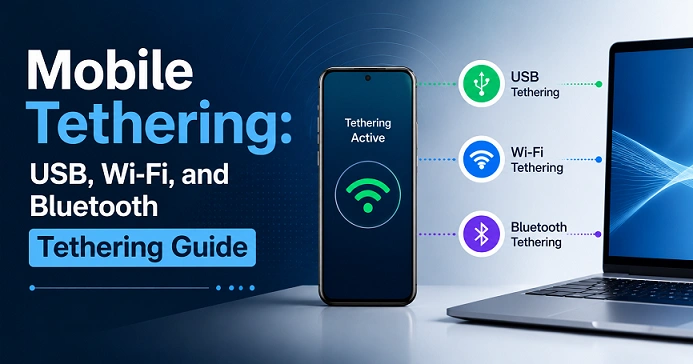
The Internet data can be shared using the below methods:
- Wi-Fi Hotspot
- USB Tethering
- Bluetooth Tethering
What does tethering mean?
The word “tethering” means to “add” or “connect.” In technology terms, it means a device sharing its internet with another device. Today, almost every smartphone has a tethering feature built in.
🤔 How does it work?
When you switch on the device, it’s tethering to your phone. Then it will get Internet from the mobile available network, and then it will send it to the other nearby devices. That means your phone will become the internet receiver and internet distributor, and this work will be done by the hotspot, USB, and Bluetooth.
What are the different types of tethering?
1. Wi-Fi Mobile Hotspot Tethering
This is one of the most popular tethering methods; kids of the new generation know perfectly about this. In this feature, your phone will work like a Wi-Fi router.
How do you set up a mobile hotspot?
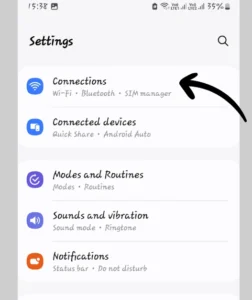
Step 1: Open the mobile setting.
[Image credit: Ravi Deogam]
Step 2: Now choose the Network & Internet option, and click it.
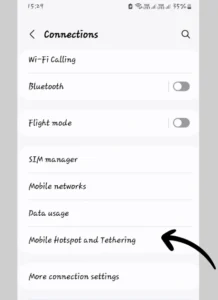
Step 3: Choose the mobile hotspot & tethering option or mobile hotspot setting, and click it.
[Image credit: Ravi Deogam]
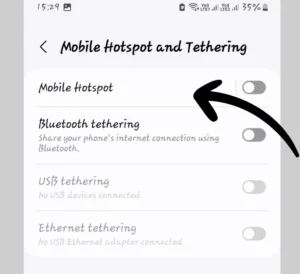
Step 4: Choose the Wi-Fi hotspot option, and click it.
[Image credit: Ravi Deogam]
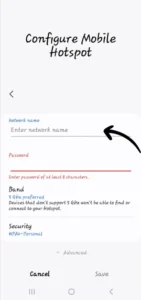
Step 5:
[Image credit: Ravi Deogam]
Here, you can set the hotspot name; you do not need to change the security option and set the hotspot password. In the advanced option, you can also turn on or off the hotspot automatic option when no one is connected, and also you can set the hotspot band for hotspot sharing speed; the lower band, 2.5 GHz, comes with long-range sharing with low speed, but 5 GHz gives you more speed with less coverage.
How to connect with other devices:
Step 1:
Open the other device’s Wi-Fi section. The device will automatically search the nearby available networks.
Step 2:
Choose the device name or the Wi-Fi name, which shares the internet data by mobile hotspot or Wi-Fi router name, and click the network.
Step 3:
Now you enter the hotspot password to connect to the Wi-Fi network.
Pros 👍
|
Cons 👎
|
2. USB Tethering
This is one of the best options for a stable and fast tethering method. This method best suits those devices that do not come with a Wi-Fi option. To connect your phone to the device, you must have a data cable; you can use the charging cable, one end of which has a type A or type C port, so that you can connect to your computer or laptop.
How do you connect your phone and PC by USB tethering?
Step 1:
First of all, you have to connect your phone with a data cable and insert the other end of the data cable into the PC or laptop.
Step 2:
The pop-up option will be enabled in your mobile notification. You have to click that notification and select the USB tethering option to connect the mobile internet to the PC or laptop.
Pros 👍
|
Cons 👎
|
3. Bluetooth Tethering
In this method, the internet will be shared by Bluetooth. This option is one of the less-used methods to share the mobile internet with someone because this gives very low internet speed.
How do you connect your phone and PC by USB tethering?
Step 1:
Open Bluetooth on both devices.
Step 2:
Pair the devices
Step 3:
Enable the Bluetooth tethering.
Pros 👍
|
Cons 👎
|
Security tips to use tethering.
Use a strong password:
- At least 8 to 12 characters
- Use lower and upper case alphabets
- Use numbers and symbols
Use WPA2/WPA3 encryption:
This will protect your hotspot from external threats.
Use auto-disable features:
Always On features this to turn off your hotspot automatically.
Remove unknown devices immediately:
Always remove the unknown connected devices to stay protected from hacking threats.
Tips to save your mobile internet data balance.
|
Always disable the auto-update option on your PC & laptop to reduce the data consumption. |
|
Use the data-saving option in YouTube’s Wi-Fi connection data-use option or set it to low-quality streaming. |
|
Must remove the background apps or turn off the background use of apps in their app settings. |
|
Set the data sharing limit to save your mobile data in the data use option. |
What are the common problems and solutions?
- Hotspot connection problem.
Solution: You have to
- Enter password correctly
- Restart the hotspot
- Restart the phone
2. The internet is not working.
Solution: You must do
- Enable the mobile data.
- Disable the airplane mode
- Disable the data roaming
- Check the network connection of your SIM.
- Reset the network access point names in your mobile network
3. Battery is draining
Solution:
- On power save mode
- Use USB tethering; this mode will also charge your phone slowly.
4. Frequently turn-off hotspot
Solution:
- Turn off the battery optimization
- Turn off the auto-turn-off hotspot option
- Restart the phone and turn the hotspot again
Read Also: Essential Gadgets List for the Home Kitchen to Cook Faster.
Does tethering damage the battery?
Not directly, but if you use it continuously, your phone has to face heating, changing charging cycles, and high usage can affect your battery health. But it did not affect normal use.
Is tethering good for gaming?
If you have a good 4G/5G network with a stable signal, then definitely you can use USB tethering for gaming purposes. But in some cases, ping will fluctuate, and network instability may occur if you don’t have a stable and steady network on your phone.
Can tethering be an alternative option for broadband connection?
To some extent, yes, it can be an alternative option for broadband connection. If you have an unlimited 5G plan, then it will be best for:
- Work-from-home jobs
- Online classes
- Video and movie steaming
But if you are running an online business and for heavy use, I recommend that you must use a broadband connection.
Frequently asked questions
Question: What is USB tethering?
Answer: To connect your mobile internet to your PC or laptop using a USB data cable.
Question: Which is better, Wi-Fi or USB tethering?
Answer: USB tethering is more stable and fast, so USB tethering is better as compared to Wi-Fi.
Question: Are hotspot and tethering different?
Answer: Hotspot is the type of tethering.
Question: Is tethering available on iPhone?
Answer: Yes, iPhones have a tethering option.
Question: Is 5G tethering fast?
Answer: Yes, 5G tethering will give you fast internet speed.
Read Also: Awesome tricks to take a screenshot in Windows 10 & 11.
You can check official Microsoft Support for Windows 10 & 11.
Conclusion:
Phone tethering is a highly useful feature in today’s time that can turn your smartphone into a portable internet hub. Using this, you can share your mobile internet with other devices anytime and anywhere. Whether it is for work from home, an online class, travel, or an emergency internet need, phone tethering comes in very handy in every situation. If you adopt the right security settings, data management, and proper usage, tethering can prove to be a powerful, convenient, and reliable internet solution.
Dear readers ❤️,
We hope that this phone tethering guide has been useful and informative for you. If you liked this article, be sure to share it with your friends and family so that they can also make proper use of their smartphone’s internet features.
To read similar new technology tips, smartphone guides, internet tricks, and the latest tech updates, visit our website regularly and don’t forget to follow us. Your support inspires us to bring better and more useful information.
Thank You.